
Bridging Collaboration and ALM with Microsoft Teams and Codebeamer
The NANGA Codebeamer Teams Integration (NCTI) connects Microsoft Teams with PTC Codebeamer and brings selected Application Lifecycle Management (ALM) capabilities directly into the collaboration space where teams already work. Instead of switching between tools, users can stay within Microsoft Teams while remaining fully connected to key development processes in Codebeamer.
This approach reduces context switching, improves transparency, and makes it easier for teams to act directly on relevant development information exactly where communication already happens.
With the latest product updates, NCTI introduces several enhancements focused on usability, performance, and deeper integration between communication and ALM workflows.
New Features
Access Anywhere with Microsoft Teams
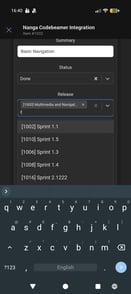 With Microsoft Teams available as a mobile app as well as on desktop, users can stay connected to key ALM updates and collaboration content at any time.
This ensures that teams remain informed and responsive even when they are not at their workstation, supporting continuous collaboration and faster decision-making across distributed environments.
View detailed change history from notification cards
A new “View Changes” button on notification cards opens an inline diff view that shows exactly what has changed. Changes are clearly highlighted through insertions and deletions, making updates immediately understandable without opening Codebeamer.
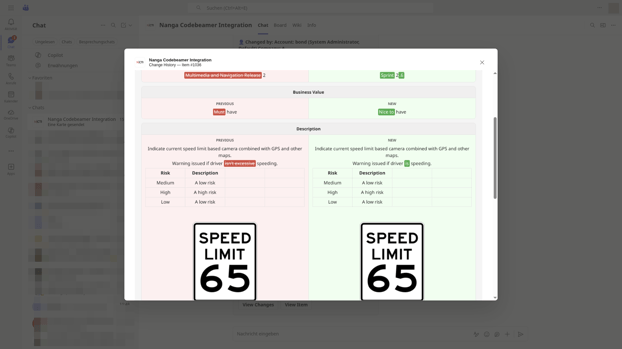
The diff view supports both inline and side-by-side comparison modes, allowing users to choose the most suitable way of reviewing changes.
-1.png?width=173&height=170&name=Screenshot_20260327-164002%20(1)-1.png) In addition, a comment form is available directly within the view, enabling users to respond to changes in context and accelerate feedback cycles.
In addition, a comment form is available directly within the view, enabling users to respond to changes in context and accelerate feedback cycles.
View and edit tracker items directly from Teams notifications
With the new “View Item” functionality, users can open a full Codebeamer tracker item directly from a Teams notification. The item view includes all relevant fields and provides a complete overview without leaving Microsoft Teams.
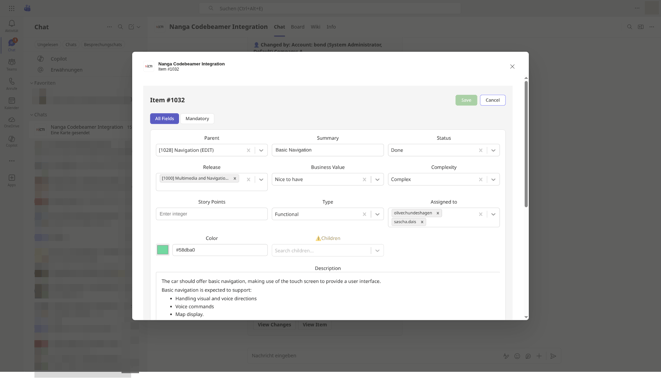
Users can switch into edit mode, update fields inline, and save changes directly back to Codebeamer. This significantly streamlines daily workflows by reducing the need to switch between systems while maintaining full traceability in the ALM tool.
Bugfixes
Improved dropdown performance with server-side search
Dropdown fields have been optimized by introducing server-side search. Instead of loading all available values at once, fields such as Assigned To, Supervisor, Parent Items, and Release now use type-ahead search.
.png?width=741&height=417&name=903747fc-665e-41a6-911b-19e0b46502df%20(1).png)
This improvement significantly enhances performance and responsiveness, especially in large projects with extensive datasets, and provides a smoother user experience when working with selection fields.
Improved the handling of Microsoft authentication keys
.png?width=130&height=292&name=Screenshot_20260327-163835%20(1).png) Microsoft authentication handling has been improved to ensure that authentication keys are automatically refreshed in the background. This prevents a rare session timeout issue that could occur during long-running server sessions.
Microsoft authentication handling has been improved to ensure that authentication keys are automatically refreshed in the background. This prevents a rare session timeout issue that could occur during long-running server sessions.
As a result, the integration becomes more stable and reliable, particularly in environments with continuous usage and extended session durations.
Continuous Improvement at NANGA SYSTEMS
The latest NCTI release further strengthens the integration between Microsoft Teams and PTC Codebeamer by making ALM-related actions more accessible and efficient within the collaboration environment.
At NANGA SYSTEMS, we are continuously improving and extending our products to deliver the best possible service for our customers. Each release is driven by real-world needs, with the goal of making integrations more powerful, reliable, and easy to use in complex enterprise environments.